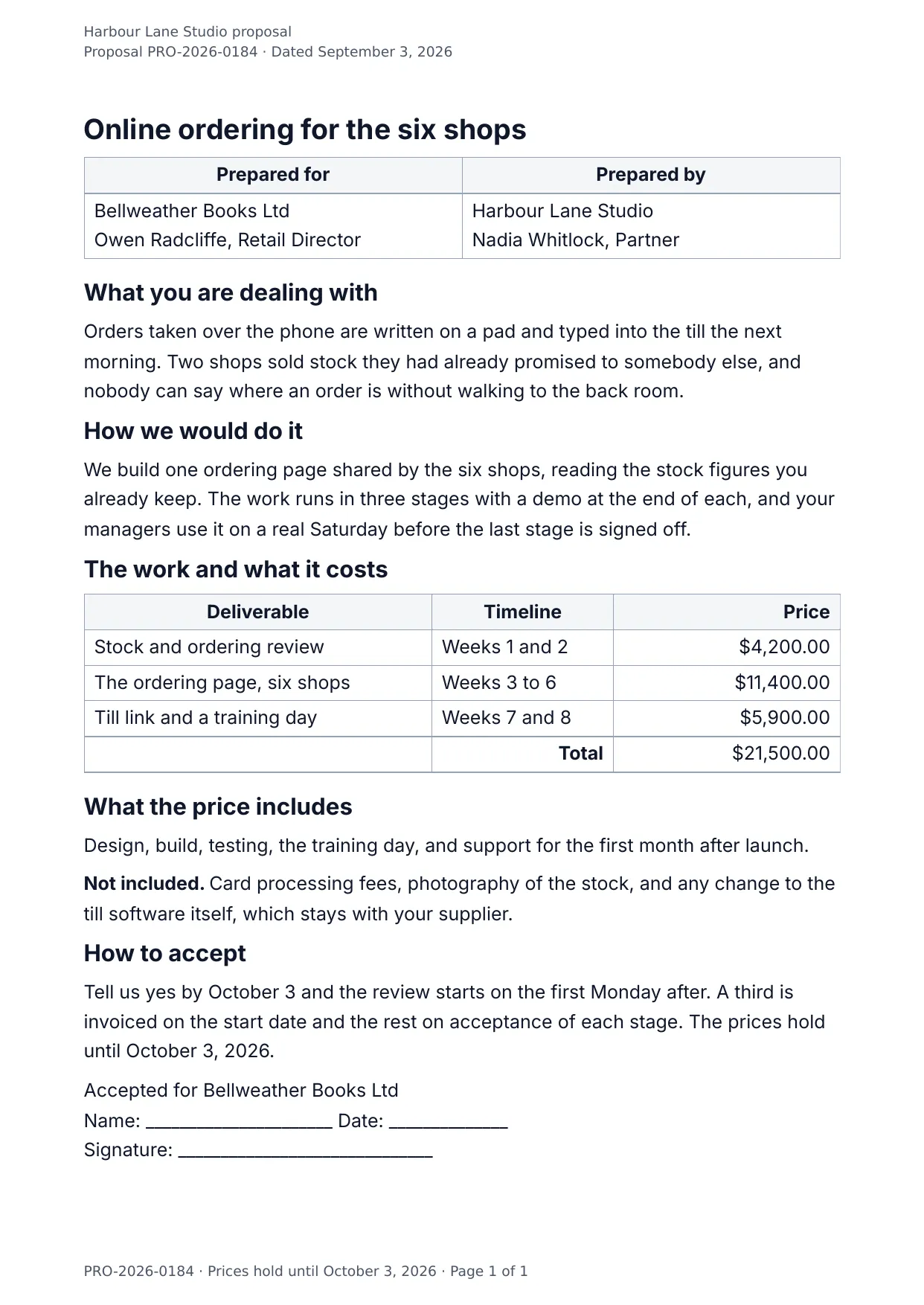
The first page of the document DocMake makes from the sample values on this page.
Sales
Business Proposal
A proposal that reads like you thought about the client, not about your template: the problem first, the approach second, the priced deliverables third.
Deliverable rows repeat from your data, so a three-line proposal and a ten-line proposal share the same polished layout.
Blanks to fill
| proposal_title | Proposal title |
| client_name | Client |
| client_contact | Client contact |
| company_name | Company |
| author_name | Written by |
| author_role | Role |
| problem_statement | The problem |
| approach | The approach |
| total | Total |
| price_includes | What the price includes |
| price_excludes | What the price does not include |
| next_steps | Next steps |
| valid_until | Open until |
| proposal_number | Proposal number |
| proposal_date | Proposal date |
| deliverables[] | One per item, so a row is added for every item in the list |
The data behind the preview
This is the exact JSON that produced the document above. Change the values, POST them to the API, and you get your version back as DOCX or PDF. Lists grow and shrink with your data; the layout adapts.
- 01 Sign up free and duplicate this template into your workspace.
- 02 Adjust the wording and branding in the visual editor.
- 03 Fill it in the app, share it as a form link, or call the API.
{
  "company_name": "Harbour Lane Studio",
  "proposal_number": "PRO-2026-0184",
  "proposal_title": "Online ordering for the six shops",
  "proposal_date": "September 3, 2026",
  "valid_until": "October 3, 2026",
  "author_name": "Nadia Whitlock",
  "author_role": "Partner",
  "client_name": "Bellweather Books Ltd",
  "client_contact": "Owen Radcliffe, Retail Director",
  "problem_statement": "Orders taken over the phone are written on a pad and typed into the till the next morning. Two shops sold stock they had already promised to somebody else, and nobody can say where an order is without walking to the back room.",
  "approach": "We build one ordering page shared by the six shops, reading the stock figures you already keep. The work runs in three stages with a demo at the end of each, and your managers use it on a real Saturday before the last stage is signed off.",
  "deliverables": [
    {
      "deliverable": "Stock and ordering review",
      "timeline": "Weeks 1 and 2",
      "price": "$4,200.00"
    },
    {
      "deliverable": "The ordering page, six shops",
      "timeline": "Weeks 3 to 6",
      "price": "$11,400.00"
    },
    {
      "deliverable": "Till link and a training day",
      "timeline": "Weeks 7 and 8",
      "price": "$5,900.00"
    }
  ],
  "total": "$21,500.00",
  "price_includes": "Design, build, testing, the training day, and support for the first month after launch.",
  "price_excludes": "Card processing fees, photography of the stock, and any change to the till software itself, which stays with your supplier.",
  "next_steps": "Tell us yes by October 3 and the review starts on the first Monday after. A third is invoiced on the start date and the rest on acceptance of each stage."
}
Generate this document via the API
One template plus changing data is the whole point. The list of blanks above is the contract, and every new set of values comes back in the same layout: fill it in the app, hand someone a form link, or POST the JSON and get the file straight back.
The request below carries this page's own values, so it runs as soon as the template exists in your workspace. Swap the values for yours and the response is your document.
curl -X POST https://app.docmake.io/api/v1/render \
  -H "Authorization: Bearer $DOCMAKE_API_KEY" \
  -H "Content-Type: application/json" \
  -H "Accept: application/json" \
  --output business-proposal.pdf \
  --data-binary @- <<'JSON'
{
  "template_id": "tmpl_your_template_id",
  "format": "pdf",
  "data": {
    "company_name": "Harbour Lane Studio",
    "proposal_number": "PRO-2026-0184",
    "proposal_title": "Online ordering for the six shops",
    "proposal_date": "September 3, 2026",
    "valid_until": "October 3, 2026",
    "author_name": "Nadia Whitlock",
    "author_role": "Partner",
    "client_name": "Bellweather Books Ltd",
    "client_contact": "Owen Radcliffe, Retail Director",
    "problem_statement": "Orders taken over the phone are written on a pad and typed into the till the next morning. Two shops sold stock they had already promised to somebody else, and nobody can say where an order is without walking to the back room.",
    "approach": "We build one ordering page shared by the six shops, reading the stock figures you already keep. The work runs in three stages with a demo at the end of each, and your managers use it on a real Saturday before the last stage is signed off.",
    "deliverables": [
      {
        "deliverable": "Stock and ordering review",
        "timeline": "Weeks 1 and 2",
        "price": "$4,200.00"
      },
      {
        "deliverable": "The ordering page, six shops",
        "timeline": "Weeks 3 to 6",
        "price": "$11,400.00"
      },
      {
        "deliverable": "Till link and a training day",
        "timeline": "Weeks 7 and 8",
        "price": "$5,900.00"
      }
    ],
    "total": "$21,500.00",
    "price_includes": "Design, build, testing, the training day, and support for the first month after launch.",
    "price_excludes": "Card processing fees, photography of the stock, and any change to the till software itself, which stays with your supplier.",
    "next_steps": "Tell us yes by October 3 and the review starts on the first Monday after. A third is invoiced on the start date and the rest on acceptance of each stage."
  }
}
JSON
tmpl_your_template_id is
a stand-in: build this template in the visual editor and copy the id it shows, or create one with POST /api/v1/templates. Keys, formats, strict mode and batches are in the API reference.
Or let an AI assistant do it
The DocMake MCP server lets Claude and other assistants make this document the same way. Install it once:
claude mcp add docmake \
  --env DOCMAKE_API_KEY=dm_your_api_key \
  -- npx -y @docmake/mcp@latest
Then ask for the document in plain words:
Make a PDF from my Business Proposal template with proposal title "Online ordering for the six shops" and client "Bellweather Books Ltd".
More sales templates
Sales Commission Statement
Every deal that counted this period with its rate and its payout, the adjustments, and the total owed to one sales person.
View template →Order Confirmation
Sent the moment an order lands: what was bought, what it costs, when it arrives and who to tell if something is wrong.
View template →Price List
What everything costs, one row per product, with the volume discounts, the terms and the day the prices run out.
View template →