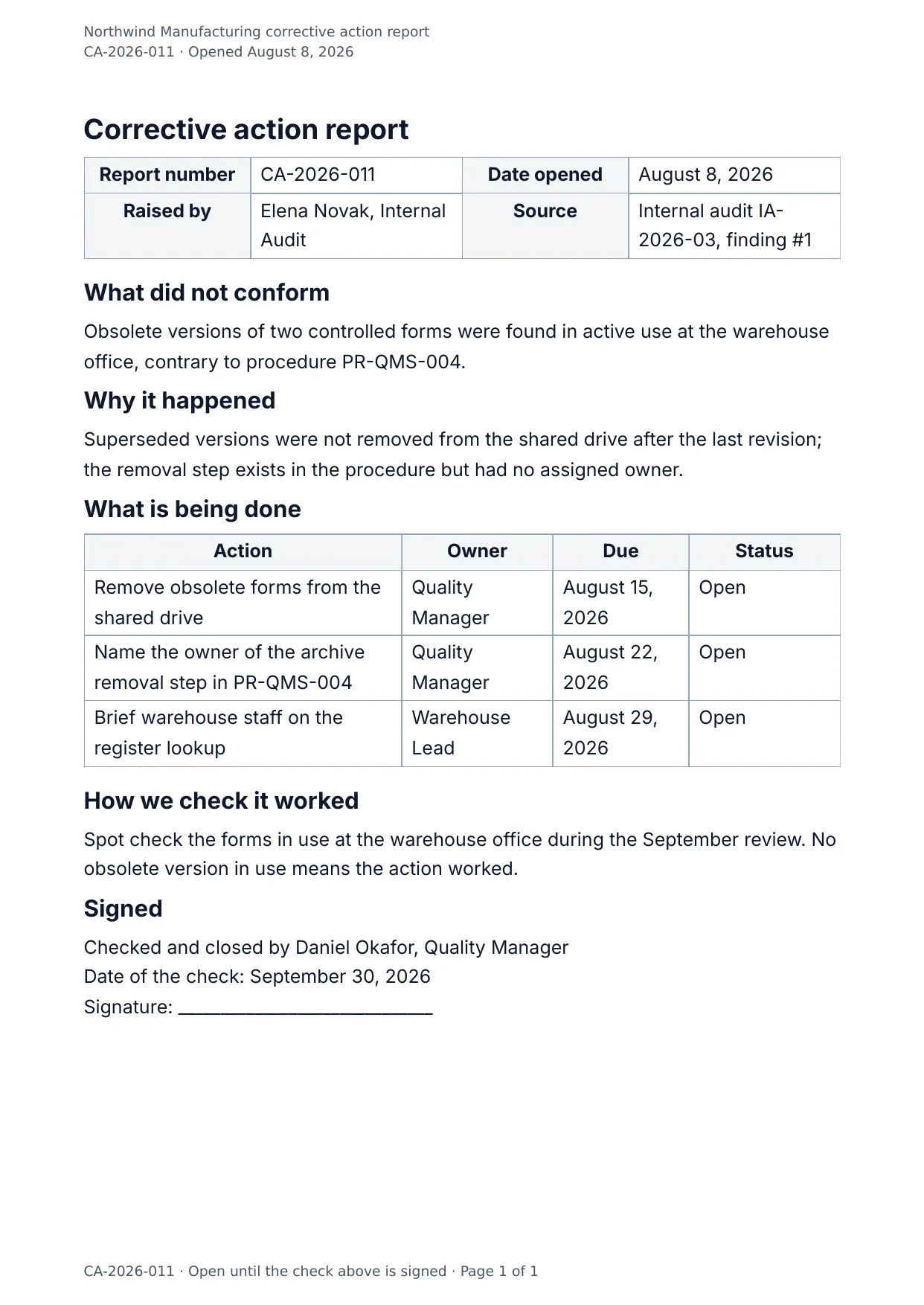
The first page of the document DocMake makes from the sample values on this page.
Compliance
Corrective Action Report
The CAPA loop in one document: what went wrong, why it went wrong, what you will do about it, and how you will know it worked.
The action plan is a repeating table, so multi-step corrections stay structured.
Blanks to fill
| capa_number | Corrective action number |
| open_date | Date opened |
| raised_by | Raised by |
| source | Source |
| nonconformity | What did not conform |
| root_cause | Root cause |
| effectiveness_check | How we check it worked |
| verifier | Verifier |
| verify_date | Date of the check |
| company_name | Company |
| actions[] | One per item, so a row is added for every item in the list |
The data behind the preview
This is the exact JSON that produced the document above. Change the values, POST them to the API, and you get your version back as DOCX or PDF. Lists grow and shrink with your data; the layout adapts.
- 01 Sign up free and duplicate this template into your workspace.
- 02 Adjust the wording and branding in the visual editor.
- 03 Fill it in the app, share it as a form link, or call the API.
{
  "company_name": "Northwind Manufacturing",
  "capa_number": "CA-2026-011",
  "open_date": "August 8, 2026",
  "raised_by": "Elena Novak, Internal Audit",
  "source": "Internal audit IA-2026-03, finding #1",
  "nonconformity": "Obsolete versions of two controlled forms were found in active use at the warehouse office, contrary to procedure PR-QMS-004.",
  "root_cause": "Superseded versions were not removed from the shared drive after the last revision; the removal step exists in the procedure but had no assigned owner.",
  "actions": [
    {
      "action": "Remove obsolete forms from the shared drive",
      "owner": "Quality Manager",
      "due": "August 15, 2026",
      "status": "Open"
    },
    {
      "action": "Name the owner of the archive removal step in PR-QMS-004",
      "owner": "Quality Manager",
      "due": "August 22, 2026",
      "status": "Open"
    },
    {
      "action": "Brief warehouse staff on the register lookup",
      "owner": "Warehouse Lead",
      "due": "August 29, 2026",
      "status": "Open"
    }
  ],
  "effectiveness_check": "Spot check the forms in use at the warehouse office during the September review. No obsolete version in use means the action worked.",
  "verifier": "Daniel Okafor, Quality Manager",
  "verify_date": "September 30, 2026"
}
Generate this document via the API
One template plus changing data is the whole point. The list of blanks above is the contract, and every new set of values comes back in the same layout: fill it in the app, hand someone a form link, or POST the JSON and get the file straight back.
The request below carries this page's own values, so it runs as soon as the template exists in your workspace. Swap the values for yours and the response is your document.
curl -X POST https://app.docmake.io/api/v1/render \
  -H "Authorization: Bearer $DOCMAKE_API_KEY" \
  -H "Content-Type: application/json" \
  -H "Accept: application/json" \
  --output corrective-action-report.pdf \
  --data-binary @- <<'JSON'
{
  "template_id": "tmpl_your_template_id",
  "format": "pdf",
  "data": {
    "company_name": "Northwind Manufacturing",
    "capa_number": "CA-2026-011",
    "open_date": "August 8, 2026",
    "raised_by": "Elena Novak, Internal Audit",
    "source": "Internal audit IA-2026-03, finding #1",
    "nonconformity": "Obsolete versions of two controlled forms were found in active use at the warehouse office, contrary to procedure PR-QMS-004.",
    "root_cause": "Superseded versions were not removed from the shared drive after the last revision; the removal step exists in the procedure but had no assigned owner.",
    "actions": [
      {
        "action": "Remove obsolete forms from the shared drive",
        "owner": "Quality Manager",
        "due": "August 15, 2026",
        "status": "Open"
      },
      {
        "action": "Name the owner of the archive removal step in PR-QMS-004",
        "owner": "Quality Manager",
        "due": "August 22, 2026",
        "status": "Open"
      },
      {
        "action": "Brief warehouse staff on the register lookup",
        "owner": "Warehouse Lead",
        "due": "August 29, 2026",
        "status": "Open"
      }
    ],
    "effectiveness_check": "Spot check the forms in use at the warehouse office during the September review. No obsolete version in use means the action worked.",
    "verifier": "Daniel Okafor, Quality Manager",
    "verify_date": "September 30, 2026"
  }
}
JSON
tmpl_your_template_id is
a stand-in: build this template in the visual editor and copy the id it shows, or create one with POST /api/v1/templates. Keys, formats, strict mode and batches are in the API reference.
Or let an AI assistant do it
The DocMake MCP server lets Claude and other assistants make this document the same way. Install it once:
claude mcp add docmake \
  --env DOCMAKE_API_KEY=dm_your_api_key \
  -- npx -y @docmake/mcp@latest
Then ask for the document in plain words:
Make a PDF from my Corrective Action Report template with corrective action number "CA-2026-011" and date opened "August 8, 2026".
More compliance templates
8D Report
The eight steps a customer expects: the team, what the problem is and is not, how it was held, why it happened and what stops a repeat.
View template →Calibration Certificate
As found and as left readings with the uncertainty at every point, the standards they are traceable to, and the rule used to pass them.
View template →Equipment Inspection Report
A periodic examination: what was checked and how, the readings against their limits, the defects graded with a date, and the verdict.
View template →