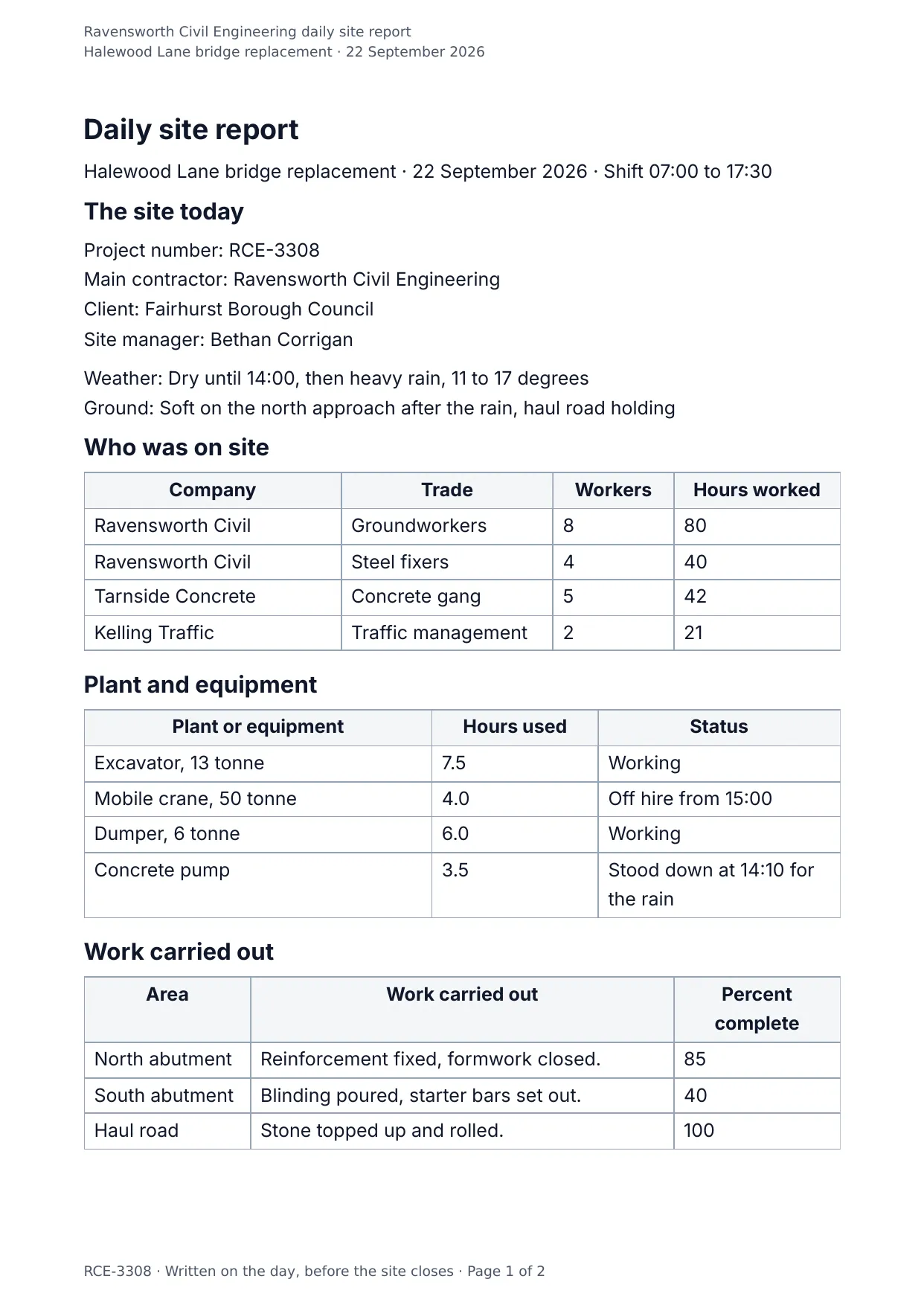
The first page of the document DocMake makes from the sample values on this page.
Operations
Daily Site Report
A daily site report is a contemporaneous record of one day on one site: who was there, what they did, what arrived, and what stopped. It is written on the day it describes, and that is precisely what gives it weight later.
Weather and headcount look like padding until the schedule slips. When a delay claim is assessed months afterwards these reports are the evidence, and missing days tend to be read against whoever failed to write them.
Delays get their own rows with an impact in hours and the action taken, because a note reading bad weather settles nothing on its own. Deliveries get rows too, since a materials shortage raised in a claim has to be traceable to a date and a supplier.
Superintendents fill these at the end of a shift, often on a phone in a site cabin, so the fields stay short and the finished document is generated rather than formatted by hand. One per site per working day adds up quickly across a program of works.
Blanks to fill
| project_name | Project |
| report_date | Report date |
| shift_start | Shift start |
| shift_end | Shift end |
| project_number | Project number |
| contractor | Main contractor |
| client | Client |
| site_manager | Site manager |
| weather | Weather |
| temperature | Temperature |
| ground_conditions | Ground conditions |
| safety_observations | Safety observations |
| incidents_reported | Incidents reported |
| visitors | Visitors to site |
| notes | Other notes |
| prepared_by | Prepared by |
| signed_on | Signed on |
| company_name | Company |
| crew[] | One per item, so a row is added for every item in the list |
| equipment[] | One per item, so a row is added for every item in the list |
| work_carried_out[] | One per item, so a row is added for every item in the list |
| deliveries[] | One per item, so a row is added for every item in the list |
| delays[] | One per item, so a row is added for every item in the list |
The data behind the preview
This is the exact JSON that produced the document above. Change the values, POST them to the API, and you get your version back as DOCX or PDF. Lists grow and shrink with your data; the layout adapts.
- 01 Sign up free and duplicate this template into your workspace.
- 02 Adjust the wording and branding in the visual editor.
- 03 Fill it in the app, share it as a form link, or call the API.
{
  "company_name": "Ravensworth Civil Engineering",
  "project_name": "Halewood Lane bridge replacement",
  "project_number": "RCE-3308",
  "contractor": "Ravensworth Civil Engineering",
  "client": "Fairhurst Borough Council",
  "report_date": "22 September 2026",
  "shift_start": "07:00",
  "shift_end": "17:30",
  "weather": "Dry until 14:00, then heavy rain",
  "temperature": "11 to 17 degrees",
  "ground_conditions": "Soft on the north approach after the rain, haul road holding",
  "site_manager": "Bethan Corrigan",
  "crew": [
    {
      "company": "Ravensworth Civil",
      "trade": "Groundworkers",
      "workers": "8",
      "hours_worked": "80"
    },
    {
      "company": "Ravensworth Civil",
      "trade": "Steel fixers",
      "workers": "4",
      "hours_worked": "40"
    },
    {
      "company": "Tarnside Concrete",
      "trade": "Concrete gang",
      "workers": "5",
      "hours_worked": "42"
    },
    {
      "company": "Kelling Traffic",
      "trade": "Traffic management",
      "workers": "2",
      "hours_worked": "21"
    }
  ],
  "equipment": [
    {
      "plant_or_equipment": "Excavator, 13 tonne",
      "hours_used": "7.5",
      "status": "Working"
    },
    {
      "plant_or_equipment": "Mobile crane, 50 tonne",
      "hours_used": "4.0",
      "status": "Off hire from 15:00"
    },
    {
      "plant_or_equipment": "Dumper, 6 tonne",
      "hours_used": "6.0",
      "status": "Working"
    },
    {
      "plant_or_equipment": "Concrete pump",
      "hours_used": "3.5",
      "status": "Stood down at 14:10 for the rain"
    }
  ],
  "work_carried_out": [
    {
      "area": "North abutment",
      "work_carried_out": "Reinforcement fixed, formwork closed.",
      "percent_complete": "85"
    },
    {
      "area": "South abutment",
      "work_carried_out": "Blinding poured, starter bars set out.",
      "percent_complete": "40"
    },
    {
      "area": "Haul road",
      "work_carried_out": "Stone topped up and rolled.",
      "percent_complete": "100"
    }
  ],
  "deliveries": [
    {
      "supplier": "Tarnside",
      "material": "C32/40 concrete",
      "quantity": "18 cubic metres",
      "received_by": "Owen Tasker"
    },
    {
      "supplier": "Marrick Steel",
      "material": "Reinforcement",
      "quantity": "6.2 tonnes",
      "received_by": "Bethan Corrigan"
    },
    {
      "supplier": "Halstow Stone",
      "material": "Type 1 stone",
      "quantity": "40 tonnes",
      "received_by": "Owen Tasker"
    }
  ],
  "delays": [
    {
      "delay_or_disruption": "Heavy rain from 14:00, pour stood down",
      "hours_lost": "3.5",
      "what_was_done": "Formwork covered, gang moved"
    },
    {
      "delay_or_disruption": "Crane arrived at 09:40 against an 08:00 slot",
      "hours_lost": "1.5",
      "what_was_done": "Told the hire desk, lift moved to the afternoon"
    }
  ],
  "safety_observations": "Two operatives without gloves at the steel bay, spoken to on the spot.",
  "incidents_reported": "None",
  "visitors": "Council engineer, 11:00 to 12:15, inducted and escorted.",
  "notes": "The pour at the north abutment moves to 23 September, first thing. The supplier has been told and the pump is booked for 07:30.",
  "prepared_by": "Bethan Corrigan, Site Manager",
  "signed_on": "22 September 2026, 17:45"
}
Generate this document via the API
One template plus changing data is the whole point. The list of blanks above is the contract, and every new set of values comes back in the same layout: fill it in the app, hand someone a form link, or POST the JSON and get the file straight back.
The request below carries this page's own values, so it runs as soon as the template exists in your workspace. Swap the values for yours and the response is your document.
curl -X POST https://app.docmake.io/api/v1/render \
  -H "Authorization: Bearer $DOCMAKE_API_KEY" \
  -H "Content-Type: application/json" \
  -H "Accept: application/json" \
  --output daily-site-report.pdf \
  --data-binary @- <<'JSON'
{
  "template_id": "tmpl_your_template_id",
  "format": "pdf",
  "data": {
    "company_name": "Ravensworth Civil Engineering",
    "project_name": "Halewood Lane bridge replacement",
    "project_number": "RCE-3308",
    "contractor": "Ravensworth Civil Engineering",
    "client": "Fairhurst Borough Council",
    "report_date": "22 September 2026",
    "shift_start": "07:00",
    "shift_end": "17:30",
    "weather": "Dry until 14:00, then heavy rain",
    "temperature": "11 to 17 degrees",
    "ground_conditions": "Soft on the north approach after the rain, haul road holding",
    "site_manager": "Bethan Corrigan",
    "crew": [
      {
        "company": "Ravensworth Civil",
        "trade": "Groundworkers",
        "workers": "8",
        "hours_worked": "80"
      },
      {
        "company": "Ravensworth Civil",
        "trade": "Steel fixers",
        "workers": "4",
        "hours_worked": "40"
      },
      {
        "company": "Tarnside Concrete",
        "trade": "Concrete gang",
        "workers": "5",
        "hours_worked": "42"
      },
      {
        "company": "Kelling Traffic",
        "trade": "Traffic management",
        "workers": "2",
        "hours_worked": "21"
      }
    ],
    "equipment": [
      {
        "plant_or_equipment": "Excavator, 13 tonne",
        "hours_used": "7.5",
        "status": "Working"
      },
      {
        "plant_or_equipment": "Mobile crane, 50 tonne",
        "hours_used": "4.0",
        "status": "Off hire from 15:00"
      },
      {
        "plant_or_equipment": "Dumper, 6 tonne",
        "hours_used": "6.0",
        "status": "Working"
      },
      {
        "plant_or_equipment": "Concrete pump",
        "hours_used": "3.5",
        "status": "Stood down at 14:10 for the rain"
      }
    ],
    "work_carried_out": [
      {
        "area": "North abutment",
        "work_carried_out": "Reinforcement fixed, formwork closed.",
        "percent_complete": "85"
      },
      {
        "area": "South abutment",
        "work_carried_out": "Blinding poured, starter bars set out.",
        "percent_complete": "40"
      },
      {
        "area": "Haul road",
        "work_carried_out": "Stone topped up and rolled.",
        "percent_complete": "100"
      }
    ],
    "deliveries": [
      {
        "supplier": "Tarnside",
        "material": "C32/40 concrete",
        "quantity": "18 cubic metres",
        "received_by": "Owen Tasker"
      },
      {
        "supplier": "Marrick Steel",
        "material": "Reinforcement",
        "quantity": "6.2 tonnes",
        "received_by": "Bethan Corrigan"
      },
      {
        "supplier": "Halstow Stone",
        "material": "Type 1 stone",
        "quantity": "40 tonnes",
        "received_by": "Owen Tasker"
      }
    ],
    "delays": [
      {
        "delay_or_disruption": "Heavy rain from 14:00, pour stood down",
        "hours_lost": "3.5",
        "what_was_done": "Formwork covered, gang moved"
      },
      {
        "delay_or_disruption": "Crane arrived at 09:40 against an 08:00 slot",
        "hours_lost": "1.5",
        "what_was_done": "Told the hire desk, lift moved to the afternoon"
      }
    ],
    "safety_observations": "Two operatives without gloves at the steel bay, spoken to on the spot.",
    "incidents_reported": "None",
    "visitors": "Council engineer, 11:00 to 12:15, inducted and escorted.",
    "notes": "The pour at the north abutment moves to 23 September, first thing. The supplier has been told and the pump is booked for 07:30.",
    "prepared_by": "Bethan Corrigan, Site Manager",
    "signed_on": "22 September 2026, 17:45"
  }
}
JSON
tmpl_your_template_id is
a stand-in: build this template in the visual editor and copy the id it shows, or create one with POST /api/v1/templates. Keys, formats, strict mode and batches are in the API reference.
Or let an AI assistant do it
The DocMake MCP server lets Claude and other assistants make this document the same way. Install it once:
claude mcp add docmake \
  --env DOCMAKE_API_KEY=dm_your_api_key \
  -- npx -y @docmake/mcp@latest
Then ask for the document in plain words:
Make a PDF from my Daily Site Report template with project "Halewood Lane bridge replacement" and report date "22 September 2026".
More operations templates
Change Order
The instructed change, where it came from, what it costs line by line, what it does to the programme, and the contract sum it leaves behind.
View template →Field Service Report
One engineer visit written down: the fault, the time on site, the parts fitted, the tests that proved it and the customer signature.
View template →Goods Received Note
What the bay took in against what was ordered: accepted, rejected, and a line for anything short or damaged.
View template →