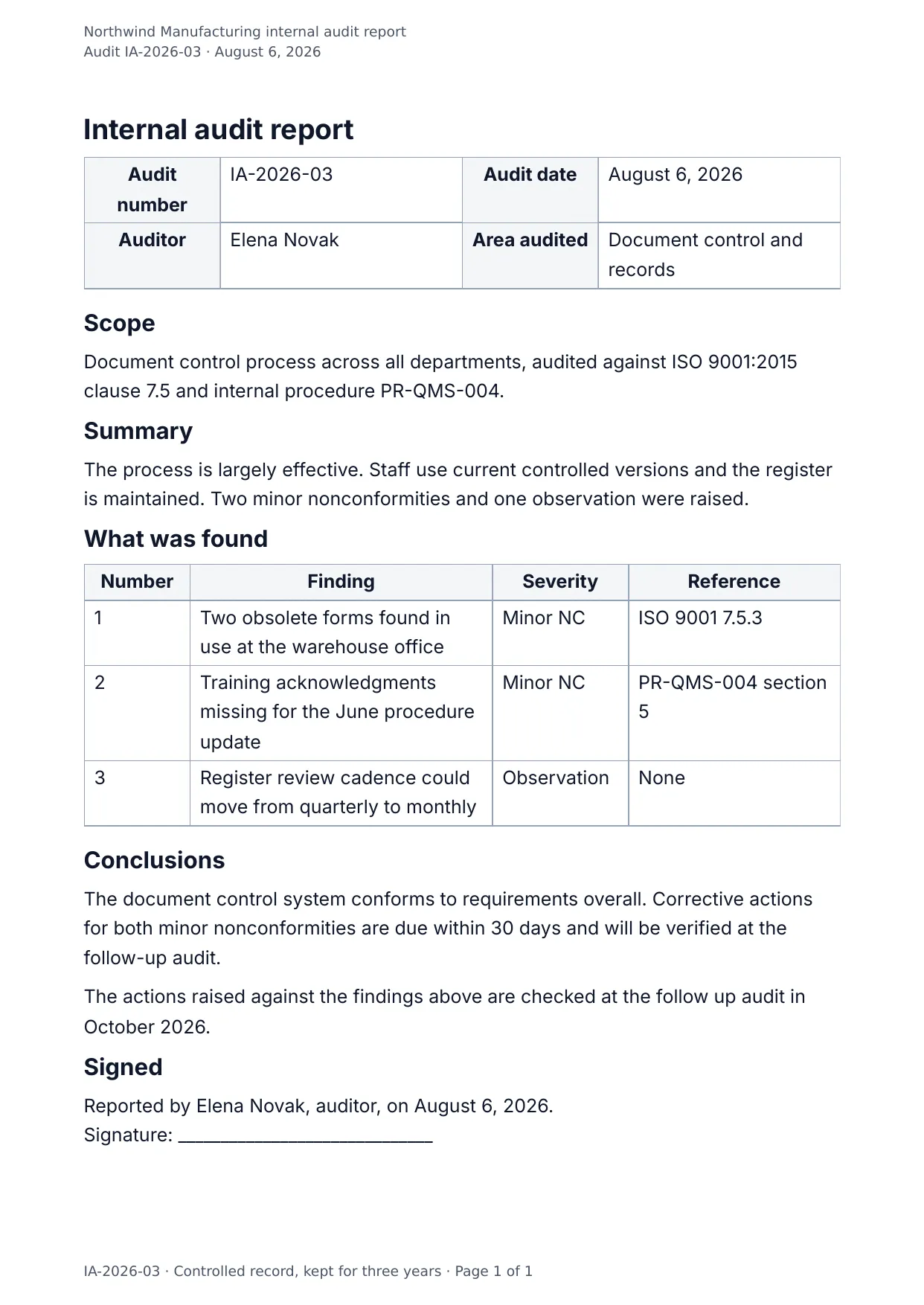
The first page of the document DocMake makes from the sample values on this page.
Compliance
Internal Audit Report
The audit report your certification body expects: scope and criteria up front, findings in a severity-graded table, conclusions and follow-up at the end.
Pairs naturally with the Controlled Procedure template for a complete ISO documentation set.
Blanks to fill
| audit_number | Audit number |
| audit_date | Audit date |
| auditor_name | Auditor |
| audited_area | Area audited |
| scope | Scope |
| summary | Summary |
| conclusions | Conclusions |
| followup_date | Follow up date |
| company_name | Company |
| findings[] | One per item, so a row is added for every item in the list |
The data behind the preview
This is the exact JSON that produced the document above. Change the values, POST them to the API, and you get your version back as DOCX or PDF. Lists grow and shrink with your data; the layout adapts.
- 01 Sign up free and duplicate this template into your workspace.
- 02 Adjust the wording and branding in the visual editor.
- 03 Fill it in the app, share it as a form link, or call the API.
{
  "company_name": "Northwind Manufacturing",
  "audit_number": "IA-2026-03",
  "audit_date": "August 6, 2026",
  "auditor_name": "Elena Novak",
  "audited_area": "Document control and records",
  "scope": "Document control process across all departments, audited against ISO 9001:2015 clause 7.5 and internal procedure PR-QMS-004.",
  "summary": "The process is largely effective. Staff use current controlled versions and the register is maintained. Two minor nonconformities and one observation were raised.",
  "findings": [
    {
      "number": "1",
      "finding": "Two obsolete forms found in use at the warehouse office",
      "severity": "Minor NC",
      "reference": "ISO 9001 7.5.3"
    },
    {
      "number": "2",
      "finding": "Training acknowledgments missing for the June procedure update",
      "severity": "Minor NC",
      "reference": "PR-QMS-004 section 5"
    },
    {
      "number": "3",
      "finding": "Register review cadence could move from quarterly to monthly",
      "severity": "Observation",
      "reference": "None"
    }
  ],
  "conclusions": "The document control system conforms to requirements overall. Corrective actions for both minor nonconformities are due within 30 days and will be verified at the follow-up audit.",
  "followup_date": "October 2026"
}
Generate this document via the API
One template plus changing data is the whole point. The list of blanks above is the contract, and every new set of values comes back in the same layout: fill it in the app, hand someone a form link, or POST the JSON and get the file straight back.
The request below carries this page's own values, so it runs as soon as the template exists in your workspace. Swap the values for yours and the response is your document.
curl -X POST https://app.docmake.io/api/v1/render \
  -H "Authorization: Bearer $DOCMAKE_API_KEY" \
  -H "Content-Type: application/json" \
  -H "Accept: application/json" \
  --output internal-audit-report.pdf \
  --data-binary @- <<'JSON'
{
  "template_id": "tmpl_your_template_id",
  "format": "pdf",
  "data": {
    "company_name": "Northwind Manufacturing",
    "audit_number": "IA-2026-03",
    "audit_date": "August 6, 2026",
    "auditor_name": "Elena Novak",
    "audited_area": "Document control and records",
    "scope": "Document control process across all departments, audited against ISO 9001:2015 clause 7.5 and internal procedure PR-QMS-004.",
    "summary": "The process is largely effective. Staff use current controlled versions and the register is maintained. Two minor nonconformities and one observation were raised.",
    "findings": [
      {
        "number": "1",
        "finding": "Two obsolete forms found in use at the warehouse office",
        "severity": "Minor NC",
        "reference": "ISO 9001 7.5.3"
      },
      {
        "number": "2",
        "finding": "Training acknowledgments missing for the June procedure update",
        "severity": "Minor NC",
        "reference": "PR-QMS-004 section 5"
      },
      {
        "number": "3",
        "finding": "Register review cadence could move from quarterly to monthly",
        "severity": "Observation",
        "reference": "None"
      }
    ],
    "conclusions": "The document control system conforms to requirements overall. Corrective actions for both minor nonconformities are due within 30 days and will be verified at the follow-up audit.",
    "followup_date": "October 2026"
  }
}
JSON
tmpl_your_template_id is
a stand-in: build this template in the visual editor and copy the id it shows, or create one with POST /api/v1/templates. Keys, formats, strict mode and batches are in the API reference.
Or let an AI assistant do it
The DocMake MCP server lets Claude and other assistants make this document the same way. Install it once:
claude mcp add docmake \
  --env DOCMAKE_API_KEY=dm_your_api_key \
  -- npx -y @docmake/mcp@latest
Then ask for the document in plain words:
Make a PDF from my Internal Audit Report template with audit number "IA-2026-03" and audit date "August 6, 2026".
More compliance templates
8D Report
The eight steps a customer expects: the team, what the problem is and is not, how it was held, why it happened and what stops a repeat.
View template →Calibration Certificate
As found and as left readings with the uncertainty at every point, the standards they are traceable to, and the rule used to pass them.
View template →Corrective Action Report
What went wrong, why it happened, the actions with an owner and a date, and the check that proves it worked.
View template →