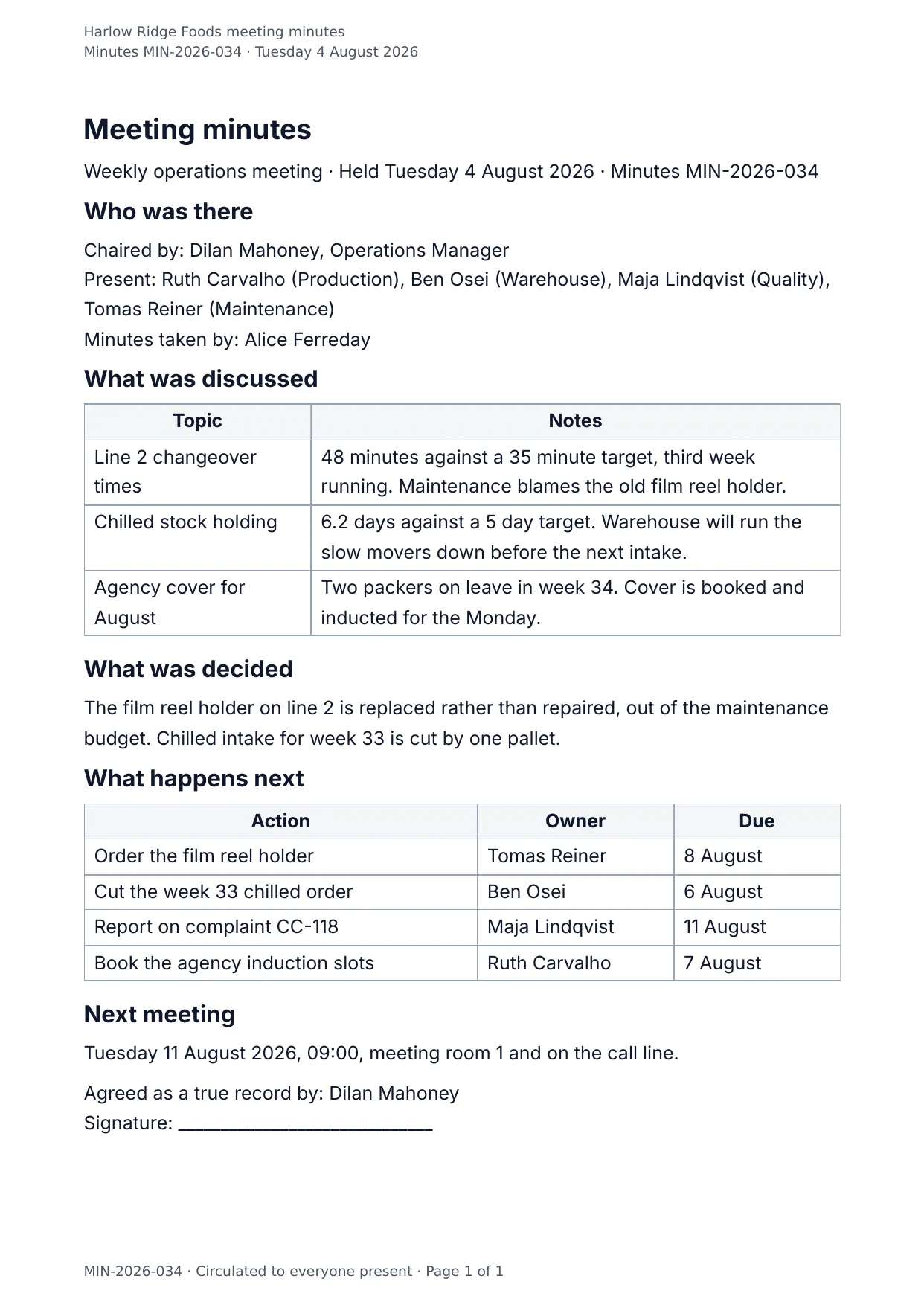
The first page of the document DocMake makes from the sample values on this page.
Operations
Meeting Minutes
Minutes people actually read: topics and notes side by side, decisions pulled out on their own, and an action table that makes ownership explicit.
Send the same data to DOCX for the archive and PDF for the follow-up email.
Blanks to fill
| meeting_title | Meeting |
| meeting_date | Date |
| minutes_reference | Minutes reference |
| facilitator | Chaired by |
| attendees | Present |
| minutes_taken_by | Minutes taken by |
| decisions | Decisions |
| next_meeting | Next meeting |
| approved_by | Agreed as a true record by |
| company_name | Company |
| agenda_items[] | One per item, so a row is added for every item in the list |
| actions[] | One per item, so a row is added for every item in the list |
The data behind the preview
This is the exact JSON that produced the document above. Change the values, POST them to the API, and you get your version back as DOCX or PDF. Lists grow and shrink with your data; the layout adapts.
- 01 Sign up free and duplicate this template into your workspace.
- 02 Adjust the wording and branding in the visual editor.
- 03 Fill it in the app, share it as a form link, or call the API.
{
  "company_name": "Harlow Ridge Foods",
  "minutes_reference": "MIN-2026-034",
  "meeting_title": "Weekly operations meeting",
  "meeting_date": "Tuesday 4 August 2026",
  "facilitator": "Dilan Mahoney, Operations Manager",
  "attendees": "Ruth Carvalho (Production), Ben Osei (Warehouse), Maja Lindqvist (Quality), Tomas Reiner (Maintenance)",
  "minutes_taken_by": "Alice Ferreday",
  "agenda_items": [
    {
      "topic": "Line 2 changeover times",
      "notes": "48 minutes against a 35 minute target, third week running. Maintenance blames the old film reel holder."
    },
    {
      "topic": "Chilled stock holding",
      "notes": "6.2 days against a 5 day target. Warehouse will run the slow movers down before the next intake."
    },
    {
      "topic": "Agency cover for August",
      "notes": "Two packers on leave in week 34. Cover is booked and inducted for the Monday."
    }
  ],
  "decisions": "The film reel holder on line 2 is replaced rather than repaired, out of the maintenance budget. Chilled intake for week 33 is cut by one pallet.",
  "actions": [
    {
      "action": "Order the film reel holder",
      "owner": "Tomas Reiner",
      "due": "8 August"
    },
    {
      "action": "Cut the week 33 chilled order",
      "owner": "Ben Osei",
      "due": "6 August"
    },
    {
      "action": "Report on complaint CC-118",
      "owner": "Maja Lindqvist",
      "due": "11 August"
    },
    {
      "action": "Book the agency induction slots",
      "owner": "Ruth Carvalho",
      "due": "7 August"
    }
  ],
  "next_meeting": "Tuesday 11 August 2026, 09:00, meeting room 1 and on the call line.",
  "approved_by": "Dilan Mahoney"
}
Generate this document via the API
One template plus changing data is the whole point. The list of blanks above is the contract, and every new set of values comes back in the same layout: fill it in the app, hand someone a form link, or POST the JSON and get the file straight back.
The request below carries this page's own values, so it runs as soon as the template exists in your workspace. Swap the values for yours and the response is your document.
curl -X POST https://app.docmake.io/api/v1/render \
  -H "Authorization: Bearer $DOCMAKE_API_KEY" \
  -H "Content-Type: application/json" \
  -H "Accept: application/json" \
  --output meeting-minutes.pdf \
  --data-binary @- <<'JSON'
{
  "template_id": "tmpl_your_template_id",
  "format": "pdf",
  "data": {
    "company_name": "Harlow Ridge Foods",
    "minutes_reference": "MIN-2026-034",
    "meeting_title": "Weekly operations meeting",
    "meeting_date": "Tuesday 4 August 2026",
    "facilitator": "Dilan Mahoney, Operations Manager",
    "attendees": "Ruth Carvalho (Production), Ben Osei (Warehouse), Maja Lindqvist (Quality), Tomas Reiner (Maintenance)",
    "minutes_taken_by": "Alice Ferreday",
    "agenda_items": [
      {
        "topic": "Line 2 changeover times",
        "notes": "48 minutes against a 35 minute target, third week running. Maintenance blames the old film reel holder."
      },
      {
        "topic": "Chilled stock holding",
        "notes": "6.2 days against a 5 day target. Warehouse will run the slow movers down before the next intake."
      },
      {
        "topic": "Agency cover for August",
        "notes": "Two packers on leave in week 34. Cover is booked and inducted for the Monday."
      }
    ],
    "decisions": "The film reel holder on line 2 is replaced rather than repaired, out of the maintenance budget. Chilled intake for week 33 is cut by one pallet.",
    "actions": [
      {
        "action": "Order the film reel holder",
        "owner": "Tomas Reiner",
        "due": "8 August"
      },
      {
        "action": "Cut the week 33 chilled order",
        "owner": "Ben Osei",
        "due": "6 August"
      },
      {
        "action": "Report on complaint CC-118",
        "owner": "Maja Lindqvist",
        "due": "11 August"
      },
      {
        "action": "Book the agency induction slots",
        "owner": "Ruth Carvalho",
        "due": "7 August"
      }
    ],
    "next_meeting": "Tuesday 11 August 2026, 09:00, meeting room 1 and on the call line.",
    "approved_by": "Dilan Mahoney"
  }
}
JSON
tmpl_your_template_id is
a stand-in: build this template in the visual editor and copy the id it shows, or create one with POST /api/v1/templates. Keys, formats, strict mode and batches are in the API reference.
Or let an AI assistant do it
The DocMake MCP server lets Claude and other assistants make this document the same way. Install it once:
claude mcp add docmake \
  --env DOCMAKE_API_KEY=dm_your_api_key \
  -- npx -y @docmake/mcp@latest
Then ask for the document in plain words:
Make a PDF from my Meeting Minutes template with meeting "Weekly operations meeting" and date "Tuesday 4 August 2026".
More operations templates
Change Order
The instructed change, where it came from, what it costs line by line, what it does to the programme, and the contract sum it leaves behind.
View template →Daily Site Report
The day on site in one sheet: weather, crew, plant, work done, deliveries and what held the job up.
View template →Field Service Report
One engineer visit written down: the fault, the time on site, the parts fitted, the tests that proved it and the customer signature.
View template →