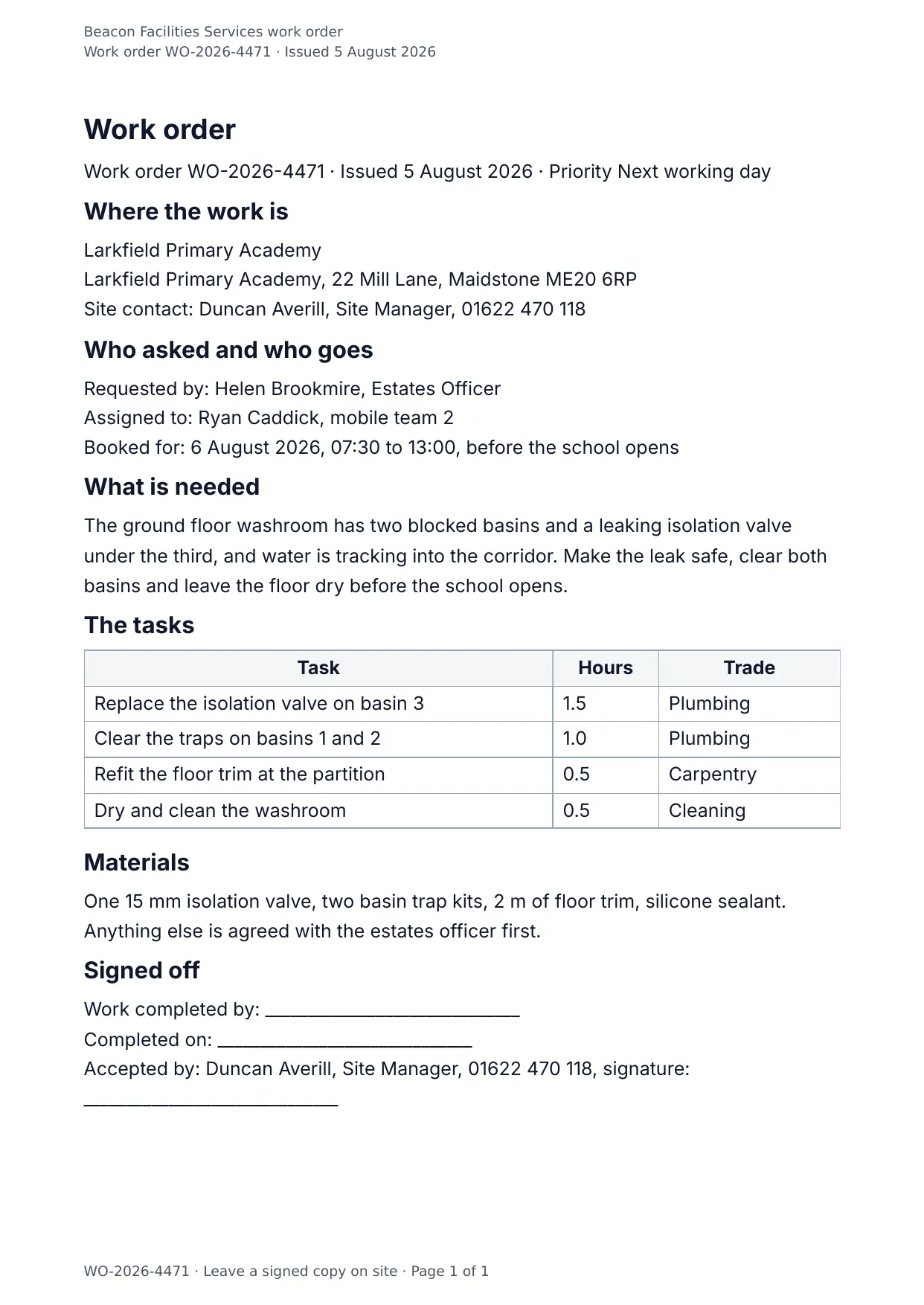
The first page of the document DocMake makes from the sample values on this page.
Operations
Work Order
For field service and maintenance teams: the job, the site, the tasks, and the sign-off, on one page.
Generate work orders from your ticketing system and hand technicians a consistent document every time.
Blanks to fill
| work_order_number | Work order number |
| issue_date | Issued |
| priority | Priority |
| client_name | Client |
| site_address | Site address |
| site_contact | Site contact |
| requested_by | Requested by |
| assigned_to | Assigned to |
| scheduled_date | Booked for |
| work_description | What is needed |
| materials | Materials |
| company_name | Company |
| tasks[] | One per item, so a row is added for every item in the list |
The data behind the preview
This is the exact JSON that produced the document above. Change the values, POST them to the API, and you get your version back as DOCX or PDF. Lists grow and shrink with your data; the layout adapts.
- 01 Sign up free and duplicate this template into your workspace.
- 02 Adjust the wording and branding in the visual editor.
- 03 Fill it in the app, share it as a form link, or call the API.
{
  "company_name": "Beacon Facilities Services",
  "work_order_number": "WO-2026-4471",
  "issue_date": "5 August 2026",
  "priority": "Next working day",
  "client_name": "Larkfield Primary Academy",
  "site_address": "Larkfield Primary Academy, 22 Mill Lane, Maidstone ME20 6RP",
  "site_contact": "Duncan Averill, Site Manager, 01622 470 118",
  "requested_by": "Helen Brookmire, Estates Officer",
  "assigned_to": "Ryan Caddick, mobile team 2",
  "scheduled_date": "6 August 2026, 07:30 to 13:00, before the school opens",
  "work_description": "The ground floor washroom has two blocked basins and a leaking isolation valve under the third, and water is tracking into the corridor. Make the leak safe, clear both basins and leave the floor dry before the school opens.",
  "tasks": [
    {
      "task": "Replace the isolation valve on basin 3",
      "hours": "1.5",
      "trade": "Plumbing"
    },
    {
      "task": "Clear the traps on basins 1 and 2",
      "hours": "1.0",
      "trade": "Plumbing"
    },
    {
      "task": "Refit the floor trim at the partition",
      "hours": "0.5",
      "trade": "Carpentry"
    },
    {
      "task": "Dry and clean the washroom",
      "hours": "0.5",
      "trade": "Cleaning"
    }
  ],
  "materials": "One 15 mm isolation valve, two basin trap kits, 2 m of floor trim, silicone sealant. Anything else is agreed with the estates officer first."
}
Generate this document via the API
One template plus changing data is the whole point. The list of blanks above is the contract, and every new set of values comes back in the same layout: fill it in the app, hand someone a form link, or POST the JSON and get the file straight back.
The request below carries this page's own values, so it runs as soon as the template exists in your workspace. Swap the values for yours and the response is your document.
curl -X POST https://app.docmake.io/api/v1/render \
  -H "Authorization: Bearer $DOCMAKE_API_KEY" \
  -H "Content-Type: application/json" \
  -H "Accept: application/json" \
  --output work-order.pdf \
  --data-binary @- <<'JSON'
{
  "template_id": "tmpl_your_template_id",
  "format": "pdf",
  "data": {
    "company_name": "Beacon Facilities Services",
    "work_order_number": "WO-2026-4471",
    "issue_date": "5 August 2026",
    "priority": "Next working day",
    "client_name": "Larkfield Primary Academy",
    "site_address": "Larkfield Primary Academy, 22 Mill Lane, Maidstone ME20 6RP",
    "site_contact": "Duncan Averill, Site Manager, 01622 470 118",
    "requested_by": "Helen Brookmire, Estates Officer",
    "assigned_to": "Ryan Caddick, mobile team 2",
    "scheduled_date": "6 August 2026, 07:30 to 13:00, before the school opens",
    "work_description": "The ground floor washroom has two blocked basins and a leaking isolation valve under the third, and water is tracking into the corridor. Make the leak safe, clear both basins and leave the floor dry before the school opens.",
    "tasks": [
      {
        "task": "Replace the isolation valve on basin 3",
        "hours": "1.5",
        "trade": "Plumbing"
      },
      {
        "task": "Clear the traps on basins 1 and 2",
        "hours": "1.0",
        "trade": "Plumbing"
      },
      {
        "task": "Refit the floor trim at the partition",
        "hours": "0.5",
        "trade": "Carpentry"
      },
      {
        "task": "Dry and clean the washroom",
        "hours": "0.5",
        "trade": "Cleaning"
      }
    ],
    "materials": "One 15 mm isolation valve, two basin trap kits, 2 m of floor trim, silicone sealant. Anything else is agreed with the estates officer first."
  }
}
JSON
tmpl_your_template_id is
a stand-in: build this template in the visual editor and copy the id it shows, or create one with POST /api/v1/templates. Keys, formats, strict mode and batches are in the API reference.
Or let an AI assistant do it
The DocMake MCP server lets Claude and other assistants make this document the same way. Install it once:
claude mcp add docmake \
  --env DOCMAKE_API_KEY=dm_your_api_key \
  -- npx -y @docmake/mcp@latest
Then ask for the document in plain words:
Make a PDF from my Work Order template with work order number "WO-2026-4471" and issued "5 August 2026".
More operations templates
Change Order
The instructed change, where it came from, what it costs line by line, what it does to the programme, and the contract sum it leaves behind.
View template →Daily Site Report
The day on site in one sheet: weather, crew, plant, work done, deliveries and what held the job up.
View template →Field Service Report
One engineer visit written down: the fault, the time on site, the parts fitted, the tests that proved it and the customer signature.
View template →