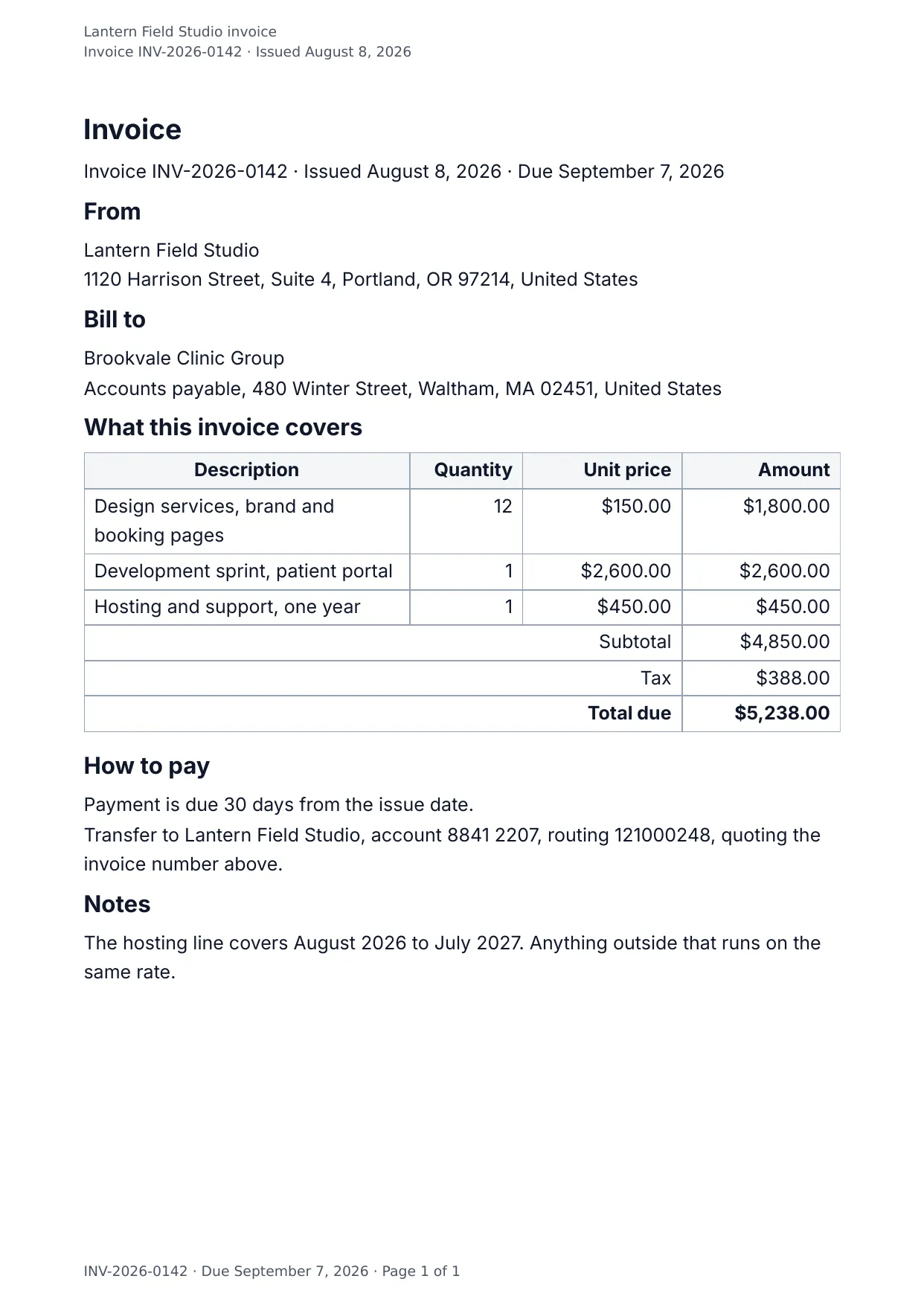
The first page of the document DocMake makes from the sample values on this page.
Finance
Invoice
The classic: bill-to block, line items that repeat for every row in your data, and totals that stay put no matter how long the item list gets.
Wire it to your billing system through the API and every invoice leaves the door identical.
Blanks to fill
| invoice_number | Invoice number |
| issue_date | Issue date |
| due_date | Due date |
| company_name | Company |
| company_address | Company address |
| client_name | Client |
| client_address | Client address |
| subtotal | Subtotal |
| tax | Tax |
| total | Total due |
| payment_terms | Payment terms |
| payment_details | Payment details |
| notes | Notes |
| items[] | One per item, so a row is added for every item in the list |
The data behind the preview
This is the exact JSON that produced the document above. Change the values, POST them to the API, and you get your version back as DOCX or PDF. Lists grow and shrink with your data; the layout adapts.
- 01 Sign up free and duplicate this template into your workspace.
- 02 Adjust the wording and branding in the visual editor.
- 03 Fill it in the app, share it as a form link, or call the API.
{
  "company_name": "Lantern Field Studio",
  "company_address": "1120 Harrison Street, Suite 4, Portland, OR 97214, United States",
  "invoice_number": "INV-2026-0142",
  "issue_date": "August 8, 2026",
  "due_date": "September 7, 2026",
  "client_name": "Brookvale Clinic Group",
  "client_address": "Accounts payable, 480 Winter Street, Waltham, MA 02451, United States",
  "items": [
    {
      "description": "Design services, brand and booking pages",
      "quantity": "12",
      "unit_price": "$150.00",
      "amount": "$1,800.00"
    },
    {
      "description": "Development sprint, patient portal",
      "quantity": "1",
      "unit_price": "$2,600.00",
      "amount": "$2,600.00"
    },
    {
      "description": "Hosting and support, one year",
      "quantity": "1",
      "unit_price": "$450.00",
      "amount": "$450.00"
    }
  ],
  "subtotal": "$4,850.00",
  "tax": "$388.00",
  "total": "$5,238.00",
  "payment_terms": "Payment is due 30 days from the issue date.",
  "payment_details": "Transfer to Lantern Field Studio, account 8841 2207, routing 121000248, quoting the invoice number above.",
  "notes": "The hosting line covers August 2026 to July 2027. Anything outside that runs on the same rate."
}
Generate this document via the API
One template plus changing data is the whole point. The list of blanks above is the contract, and every new set of values comes back in the same layout: fill it in the app, hand someone a form link, or POST the JSON and get the file straight back.
The request below carries this page's own values, so it runs as soon as the template exists in your workspace. Swap the values for yours and the response is your document.
curl -X POST https://app.docmake.io/api/v1/render \
  -H "Authorization: Bearer $DOCMAKE_API_KEY" \
  -H "Content-Type: application/json" \
  -H "Accept: application/json" \
  --output invoice.pdf \
  --data-binary @- <<'JSON'
{
  "template_id": "tmpl_your_template_id",
  "format": "pdf",
  "data": {
    "company_name": "Lantern Field Studio",
    "company_address": "1120 Harrison Street, Suite 4, Portland, OR 97214, United States",
    "invoice_number": "INV-2026-0142",
    "issue_date": "August 8, 2026",
    "due_date": "September 7, 2026",
    "client_name": "Brookvale Clinic Group",
    "client_address": "Accounts payable, 480 Winter Street, Waltham, MA 02451, United States",
    "items": [
      {
        "description": "Design services, brand and booking pages",
        "quantity": "12",
        "unit_price": "$150.00",
        "amount": "$1,800.00"
      },
      {
        "description": "Development sprint, patient portal",
        "quantity": "1",
        "unit_price": "$2,600.00",
        "amount": "$2,600.00"
      },
      {
        "description": "Hosting and support, one year",
        "quantity": "1",
        "unit_price": "$450.00",
        "amount": "$450.00"
      }
    ],
    "subtotal": "$4,850.00",
    "tax": "$388.00",
    "total": "$5,238.00",
    "payment_terms": "Payment is due 30 days from the issue date.",
    "payment_details": "Transfer to Lantern Field Studio, account 8841 2207, routing 121000248, quoting the invoice number above.",
    "notes": "The hosting line covers August 2026 to July 2027. Anything outside that runs on the same rate."
  }
}
JSON
tmpl_your_template_id is
a stand-in: build this template in the visual editor and copy the id it shows, or create one with POST /api/v1/templates. Keys, formats, strict mode and batches are in the API reference.
Or let an AI assistant do it
The DocMake MCP server lets Claude and other assistants make this document the same way. Install it once:
claude mcp add docmake \
  --env DOCMAKE_API_KEY=dm_your_api_key \
  -- npx -y @docmake/mcp@latest
Then ask for the document in plain words:
Make a PDF from my Invoice template with invoice number "INV-2026-0142" and issue date "August 8, 2026".
More finance templates
Commercial Invoice
The invoice that travels with an export: commodity code, origin and weight on every line, and a declaration to sign.
View template →Credit Note
The note that puts an overcharge right: what is being credited, why, and what it leaves owing on the invoice.
View template →Expense Report
A claim for what somebody spent, line by line with the kind of spend, the total, and a line for the approver.
View template →