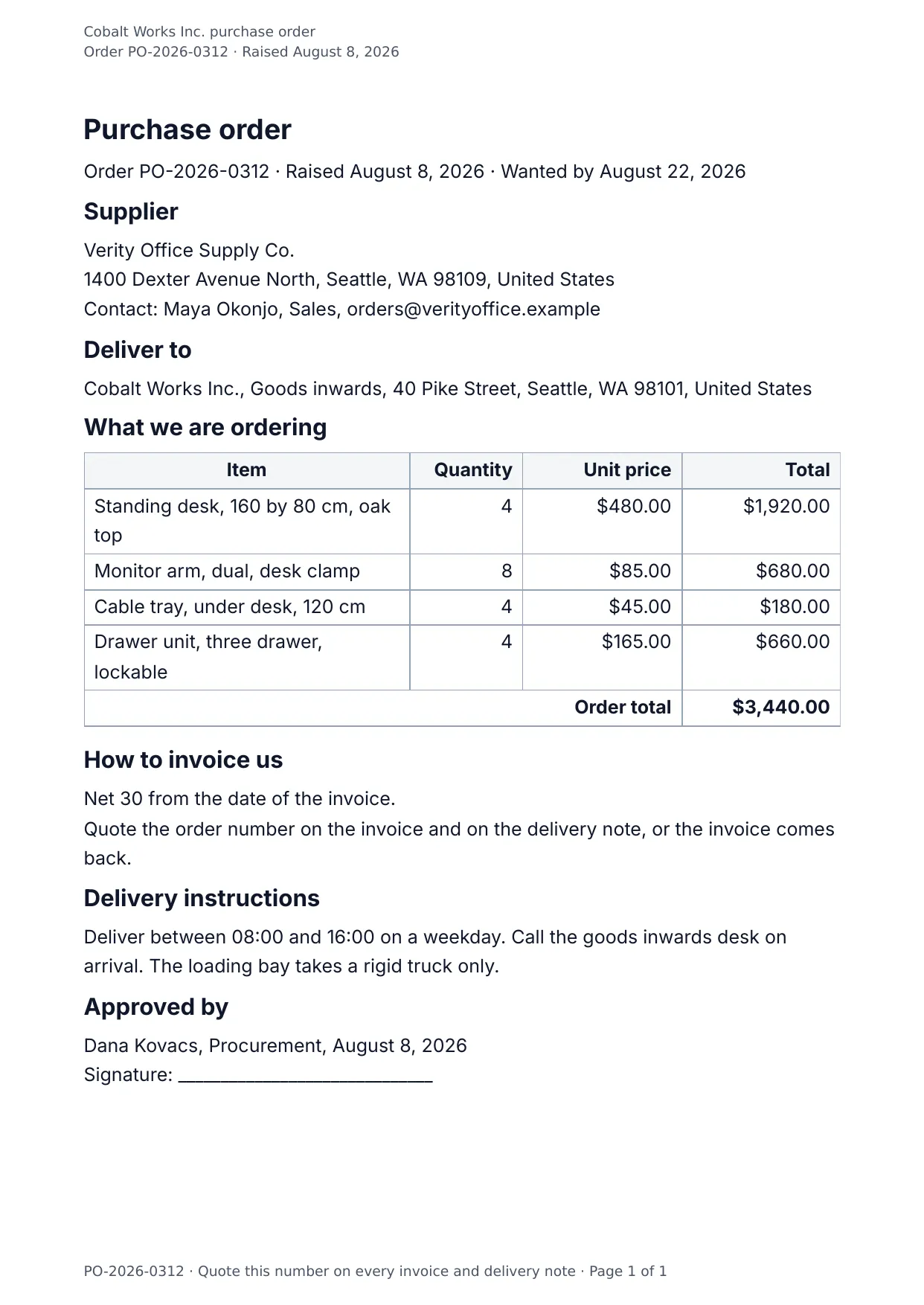
The first page of the document DocMake makes from the sample values on this page.
Finance
Purchase Order
Keep procurement consistent: every PO carries the same structure, from supplier block to authorization signature, with item rows that grow with your order.
Generate POs from your inventory system through the API, or let the team fill them in the app.
Blanks to fill
| po_number | Order number |
| order_date | Order date |
| delivery_date | Requested delivery |
| supplier_name | Supplier |
| supplier_address | Supplier address |
| supplier_contact | Supplier contact |
| delivery_address | Delivery address |
| order_total | Order total |
| payment_terms | Payment terms |
| delivery_instructions | Delivery instructions |
| approved_by | Approved by |
| company_name | Company |
| items[] | One per item, so a row is added for every item in the list |
The data behind the preview
This is the exact JSON that produced the document above. Change the values, POST them to the API, and you get your version back as DOCX or PDF. Lists grow and shrink with your data; the layout adapts.
- 01 Sign up free and duplicate this template into your workspace.
- 02 Adjust the wording and branding in the visual editor.
- 03 Fill it in the app, share it as a form link, or call the API.
{
  "company_name": "Cobalt Works Inc.",
  "po_number": "PO-2026-0312",
  "order_date": "August 8, 2026",
  "delivery_date": "August 22, 2026",
  "supplier_name": "Verity Office Supply Co.",
  "supplier_address": "1400 Dexter Avenue North, Seattle, WA 98109, United States",
  "supplier_contact": "Maya Okonjo, Sales, orders@verityoffice.example",
  "delivery_address": "Cobalt Works Inc., Goods inwards, 40 Pike Street, Seattle, WA 98101, United States",
  "items": [
    {
      "item": "Standing desk, 160 by 80 cm, oak top",
      "quantity": "4",
      "unit_price": "$480.00",
      "total": "$1,920.00"
    },
    {
      "item": "Monitor arm, dual, desk clamp",
      "quantity": "8",
      "unit_price": "$85.00",
      "total": "$680.00"
    },
    {
      "item": "Cable tray, under desk, 120 cm",
      "quantity": "4",
      "unit_price": "$45.00",
      "total": "$180.00"
    },
    {
      "item": "Drawer unit, three drawer, lockable",
      "quantity": "4",
      "unit_price": "$165.00",
      "total": "$660.00"
    }
  ],
  "order_total": "$3,440.00",
  "payment_terms": "Net 30 from the date of the invoice.",
  "delivery_instructions": "Deliver between 08:00 and 16:00 on a weekday. Call the goods inwards desk on arrival. The loading bay takes a rigid truck only.",
  "approved_by": "Dana Kovacs, Procurement"
}
Generate this document via the API
One template plus changing data is the whole point. The list of blanks above is the contract, and every new set of values comes back in the same layout: fill it in the app, hand someone a form link, or POST the JSON and get the file straight back.
The request below carries this page's own values, so it runs as soon as the template exists in your workspace. Swap the values for yours and the response is your document.
curl -X POST https://app.docmake.io/api/v1/render \
  -H "Authorization: Bearer $DOCMAKE_API_KEY" \
  -H "Content-Type: application/json" \
  -H "Accept: application/json" \
  --output purchase-order.pdf \
  --data-binary @- <<'JSON'
{
  "template_id": "tmpl_your_template_id",
  "format": "pdf",
  "data": {
    "company_name": "Cobalt Works Inc.",
    "po_number": "PO-2026-0312",
    "order_date": "August 8, 2026",
    "delivery_date": "August 22, 2026",
    "supplier_name": "Verity Office Supply Co.",
    "supplier_address": "1400 Dexter Avenue North, Seattle, WA 98109, United States",
    "supplier_contact": "Maya Okonjo, Sales, orders@verityoffice.example",
    "delivery_address": "Cobalt Works Inc., Goods inwards, 40 Pike Street, Seattle, WA 98101, United States",
    "items": [
      {
        "item": "Standing desk, 160 by 80 cm, oak top",
        "quantity": "4",
        "unit_price": "$480.00",
        "total": "$1,920.00"
      },
      {
        "item": "Monitor arm, dual, desk clamp",
        "quantity": "8",
        "unit_price": "$85.00",
        "total": "$680.00"
      },
      {
        "item": "Cable tray, under desk, 120 cm",
        "quantity": "4",
        "unit_price": "$45.00",
        "total": "$180.00"
      },
      {
        "item": "Drawer unit, three drawer, lockable",
        "quantity": "4",
        "unit_price": "$165.00",
        "total": "$660.00"
      }
    ],
    "order_total": "$3,440.00",
    "payment_terms": "Net 30 from the date of the invoice.",
    "delivery_instructions": "Deliver between 08:00 and 16:00 on a weekday. Call the goods inwards desk on arrival. The loading bay takes a rigid truck only.",
    "approved_by": "Dana Kovacs, Procurement"
  }
}
JSON
tmpl_your_template_id is
a stand-in: build this template in the visual editor and copy the id it shows, or create one with POST /api/v1/templates. Keys, formats, strict mode and batches are in the API reference.
Or let an AI assistant do it
The DocMake MCP server lets Claude and other assistants make this document the same way. Install it once:
claude mcp add docmake \
  --env DOCMAKE_API_KEY=dm_your_api_key \
  -- npx -y @docmake/mcp@latest
Then ask for the document in plain words:
Make a PDF from my Purchase Order template with order number "PO-2026-0312" and order date "August 8, 2026".
More finance templates
Commercial Invoice
The invoice that travels with an export: commodity code, origin and weight on every line, and a declaration to sign.
View template →Credit Note
The note that puts an overcharge right: what is being credited, why, and what it leaves owing on the invoice.
View template →Expense Report
A claim for what somebody spent, line by line with the kind of spend, the total, and a line for the approver.
View template →